
Cart
0
Product
Products
(empty)
No products
Product successfully added to your shopping cart
Quantity
Total
There are 0 items in your cart.
There is 1 item in your cart.
Total products
Total shipping
To be determined
Total
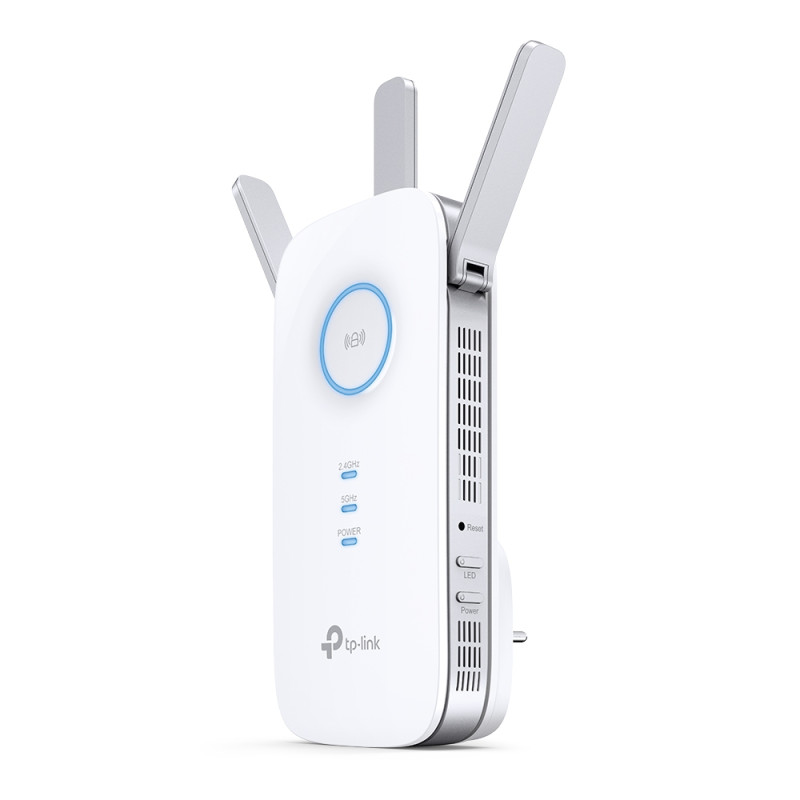


TP LINK RE450- AC1750 Wi-Fi Range Extender
10558
TP-Link
New product
AC1750 Dual Band Wi-Fi
- Three Antennas
- Gigabit Ethernet port
- Intelligent Signal Light
- AP ModeTP-Link Tether App
- Ultimate Compatibility

More info
| Strong Signals in Every Corner |
| If there’s a room where you can’t connect to the internet in your mid-size or bigger home, RE450 eliminates these dead zones. With three high-performance antennas, your WiFi transmits farther with stronger signals. RE450’s two bands (2.4 GHz and 5 GHz) also enable more reliable device connections. |
| Wi-Fi Keeps Strongest for Unlimited Moving |
| With TP-Link Mesh Technology, it’s easy to form a Mesh network with a single Wi-Fi name for seamless whole home coverage. Just connect RE450 to an OneMesh™ router. Always enjoy the strongest Wi-Fi when you’re walking around with no need to search around for a stable connection. |
| Quality Connections for Quality Experiences |
| For more coverage in other areas of your home, simply plug in RE450 for fast and stable WiFi. Equipped with 3 chipsets, RE450 provides high-speed data flow to your phone and laptop. TP-Link’s Beamforming tech ensures the high-quality signal is sent directly to your end devices, bringing your WiFi strength to a new level. |
| Lightning-Fast Speeds |
| Whether you’re binging your favorite show at the highest settings or having a meeting with your entire department, RE450’s 6-stream dual-band WiFi provides speeds up to 1.75 Gbps. With two bands, connect more devices with MU-MIMO tech letting your whole family enjoy the same strength and speed at the same time. |
| Reliable Gigabit Connection |
| Sometimes wireless just doesn’t cut it. RE 450’s Gigabit Ethernet port supports data transmissions up to 1,000 Mbps, which is 10× faster than a fast Ethernet port (100 Mbps). This lets you enjoy peak performance for wired devices that need a constant stream of Gigabit internet. |
| Easy Installation with RE Button |
| The extender RE450 works with any standard wireless router. Instantly connect the RE450 to a router by pressing the extender’s RE button followed by the router’s WPS button (if available). Once connected with an existing router, you can take RE450 anywhere within the wireless range of the existing router, no more further configurations. |
| Smart Signal Indicator |
| Find the best spot to extend your WiFi with just a glance.Blue represents strong signal whereas red represents weak signal |
| Control at Your Fingertips |
| Set up and manage your WiFi through the TP-Link Tether app from your phone (Android, iOS), including TP-Link routers and range extenders. |
| WIRELESS | |
| Working Modes | Range Extender/Access Point |
| HARDWARE FEATURES | |
| Plug Type | EU, UK, US, AU, KR, JP |
| Ports | 1 Gigabit Ethernet Port |
| Button | WPS Button, Reset Button, LED Button, Power Button |
| Input Power | 100-240V~50/60Hz |
| Power Consumption | 10W(max power consumption) |
| Dimensions ( W x D x H ) | 6.4 x 3.0 x 2.6 in. (163 x 76.4 x 66.5mm) |
| Antenna | 3 External Antennas |
| WIRELESS FEATURES | |
| Wireless Standards | IEEE 802.11a/n/ac 5 GHz, IEEE 802.11b/g/n 2.4 GHz |
| Frequency | 2.4GHz and 5GHz |
| Signal Rate | 450Mpbs at 2.4GHz, 1300Mbps at 5GHz |
| Working Modes | Range Extender/Access Point |
| Reception Sensitivity | 5GHz: |
| 11a 6Mbps:-93dBm | |
| 11a 54Mbps: -76dBm | |
| 11ac HT20 mcs8: -68dBm | |
| 11ac HT40 mcs9: -64dBm | |
| 11ac HT80 mcs9: -61dBm | |
| 2.4GHz: | |
| 11g 54Mbps: -77dBm | |
| 11n HT20 mcs7: -73dBm | |
| 11n HT40 mcs7: -70dBm | |
| Wireless Functions | Enable/Disable Wireless Radio |
| DFS (the latest firmware and hardware version is required) | |
| Access Control | |
| LED Control | |
| Power Schedule | |
| Wi-Fi Coverage | |
| Wireless Security | 64/128-bit WEP, WPA-PSK / WPA2-PSK |
| Transmission Power | 2.4G<20dBm, 5G<23dBm |
| Mesh Technology | EasyMesh-Compatible |
| OTHERS | |
| Certification | CE, FCC, RoHS |
| Package Contents | AC1750 Wi-Fi Range Extender RE450 |
| Quick Installation Guide | |
| Box Dimensions (W X D X H) | 7.9 x 4.9 x 3.4in. (202x 125 x 86mm) |
| System Requirements | Microsoft® Windows® 98SE, NT, 2000, XP, Vista or Windows 7, 8, 10, Mac® OS, NetWare®, UNIX® or Linux. |
| Environment | Operating Temperature: 0°C~30°C (32°F~86°F) |
| Storage Temperature: -40°C~70°C (-40°F~158°F) | |
| Operating Humidity: 10%~90% non-condensing | |
| Storage Humidity: 5%~90% non-condensing | |